Receipts and your accountant
The accountant pack
Sales invoices, receipts, statements and a draft tax return for a period, in one download.
The Accountant page gathers a tax period for your accountant: your sales invoices, your confirmed receipts, your bank and card statements, and a spreadsheet with a draft of the return.
- Click Reports in the side menu, then the Accountant tab.
- Choose the period. The current one is marked still running.
- Look through Things to check and sort out anything listed.
- Under Bank and card statements, add the period’s statements as PDFs.
- Click Download the pack.
- Send the zip file to your accountant.
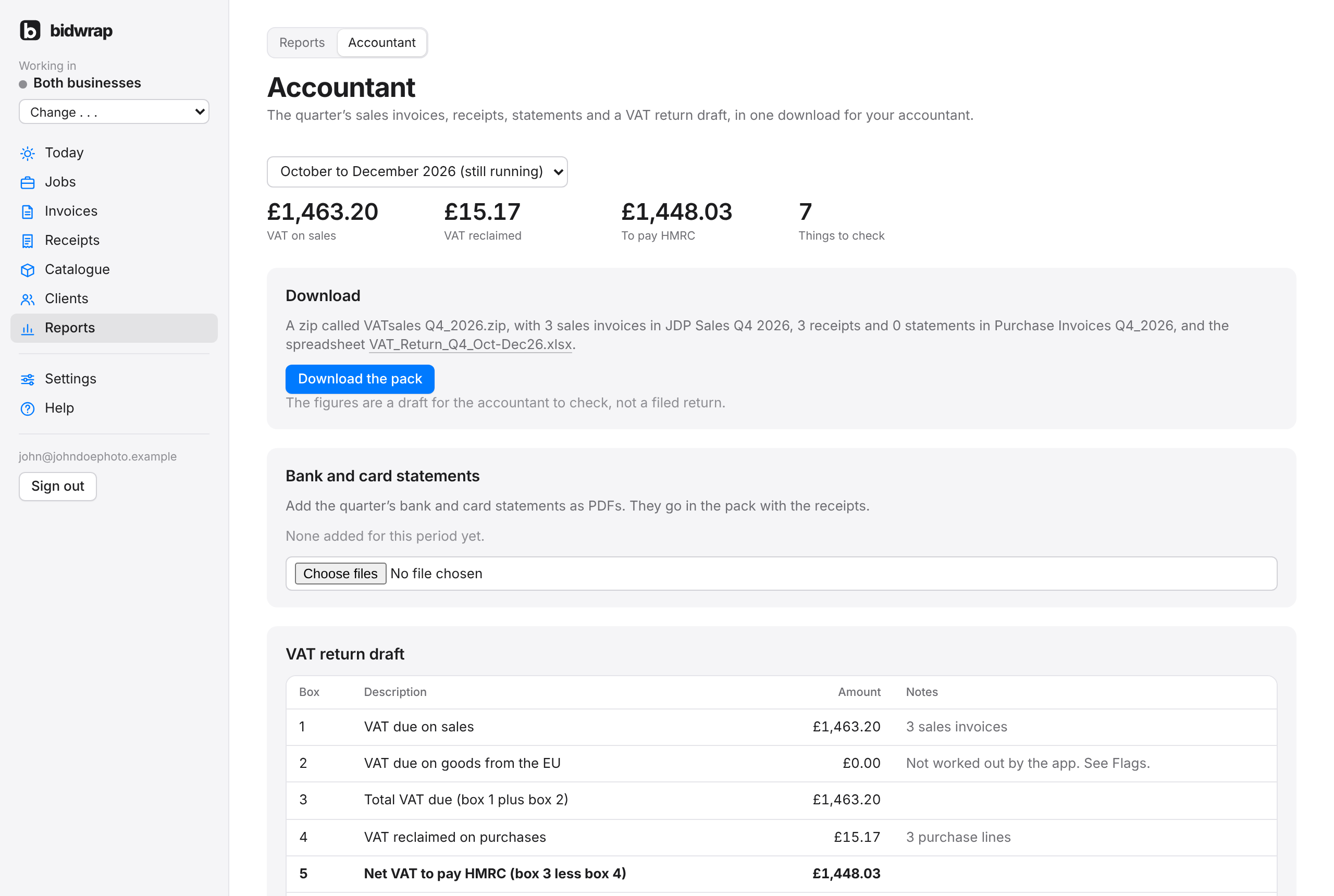
The zip is made on your own computer, so large photos never pass through the server. It has a folder of sales invoices, a folder of receipts and statements, and the spreadsheet. The page lists each sale and each purchase in the period below the download.
- Extra files kept with a receipt, such as a card slip, go in the zip beside it, named after the receipt and ending file 2.
- Receipts in your own categories, such as Farm, have their own group in the spreadsheet, for your accountant to place. No VAT or other tax is claimed back on them. They are listed under Things to check as not claimed.
How often the periods run, and when they end, comes from the tax returns settings in Settings → Business.
Good to knowThe figures are a draft for your accountant to check, not a filed return.